
How Can We Help?
PC Host Zone Files – How to Change
You may wish to see a new website on a different server to you current website. Or you may wish to view an old website that was live on a different server.
You can “trick” your computer into going to a different server to see these website.
You need to know the IP Address of the server you wish to go to.
Then:
1. Open Notepad as Administrator
2. In Notepad – “file” “open”
3. Then C drive/windows/system32/drivers/etc/hosts
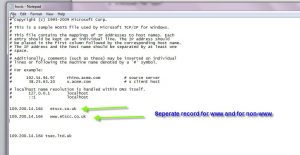
Then enter IP address and website url (non –www and www is best)
SAVE
Remember to clear when finished with the changed zone files.